LiftScan Coach

The sheet, the app, the
WhatsApp thread — one screen.

Training, food and health from the same client, in the same place, waiting when you open them. No more asking how the week went — it is tracked as it happens, and on the screen before you look. Every field, every question, every plan is yours to shape. A client takes minutes, not an evening.

one client free for you · no card, no clock · that client keeps their own app plan · a seat from the second client

Start free on the web — one client, no card, about a minute.

What it replaces
the training app the macro app the wearable dashboard the check-in form the spreadsheet the WhatsApp thread the Loom link the PDF meal plan

Eight tabs became one. Not because the features were cut — because one app already holds the training, the food and the health, so nothing has to be copied between them.

Set it up on the web →
How a client joins

Send a link. They tap it. Done.

No form, no onboarding call, no second app for them to learn — the client's app is LiftScan itself. Already on the app? Same link; nothing they logged is touched.

01
You send a link

Roster → Invite. One link per client, one seat per link. Paste it into whatever chat you already use with them.

02
They tap it

The app opens — or the App Store first, if they do not have it yet. They sign in and accept you as their coach. Thirty seconds.

03
Their log is on your screen

Training, food, health and check-ins, from that day on. On a paid seat they pay nothing — the seat covers their whole app.

Send your first link tonight →
Training · health · nutrition

All three, or you are guessing.

The lift did not stall because of the program. It stalled on four hours of sleep and 1,600 kcal. You can only see that if the training, the food and the health belong to the same client in the same app — and they only do that if the client's app is one they would use anyway. That is the whole trick: your client gets the full tracker, not a thin companion, so real logging arrives instead of a filled-in form.

Momentum — whether the training is actually moving
MOMENTUM
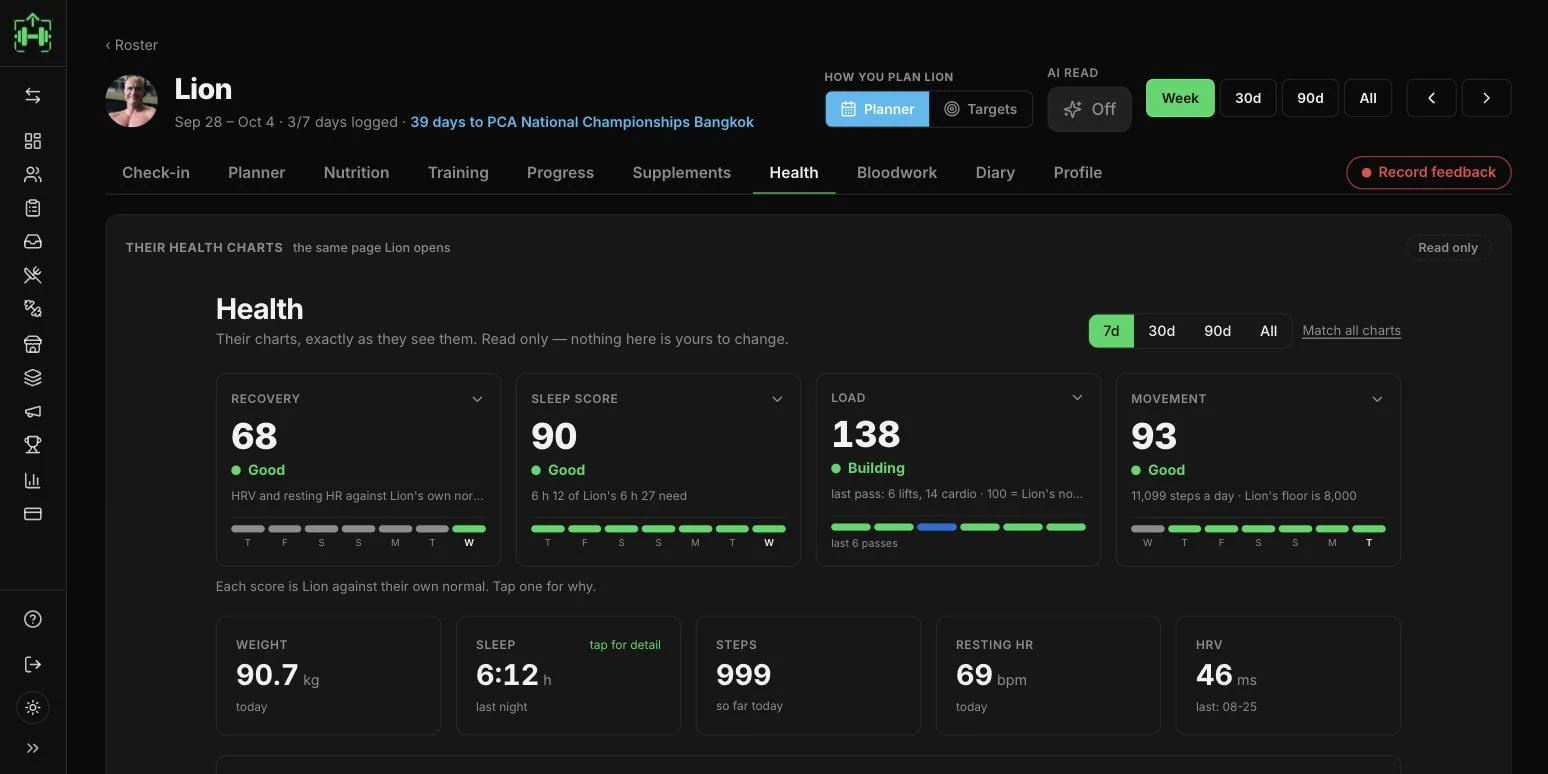
Health — sleep score, recovery, and ninety days of weight, exactly as the client sees it
HEALTH
Nutrition — what they ate against what you wrote, day by day, with the week's targets
NUTRITION

Your first program can be in the app tonight.

At a glance

You stop asking. It is already there.

No "how did the week go?", no chasing a form on Sunday. Every day is tracked as it happens and presented when you open the client — and the week is already summed: what moved, what dropped, against the week before. You set what gets asked in the first place; the daily check-in arrives pre-filled from what the app knows, so the client confirms rather than remembers.

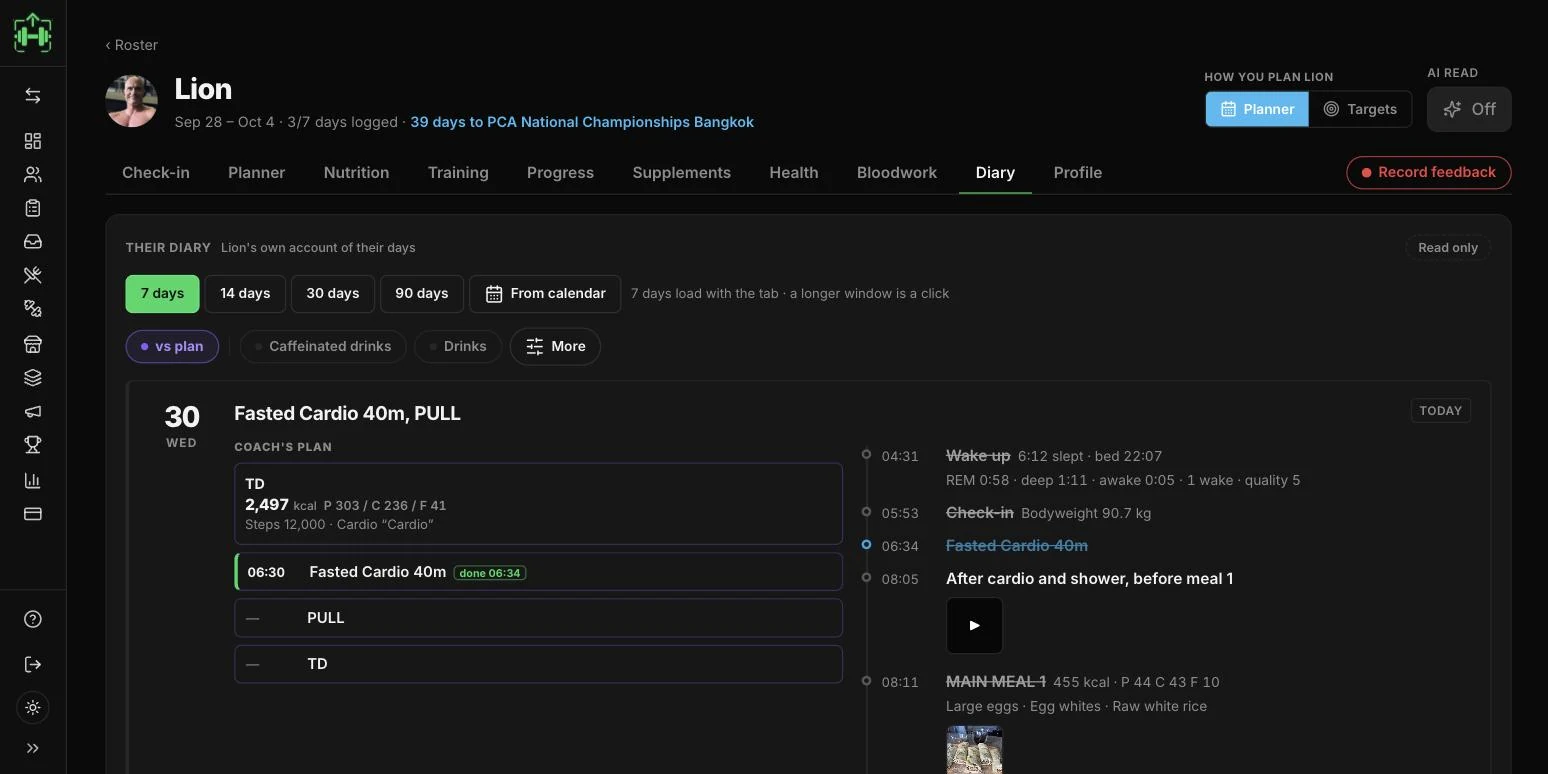
The diary tab — every day the client logged, sleep, check-in, sessions and meals, crossed off as they happened

DAILY · AS IT LANDS ON YOU

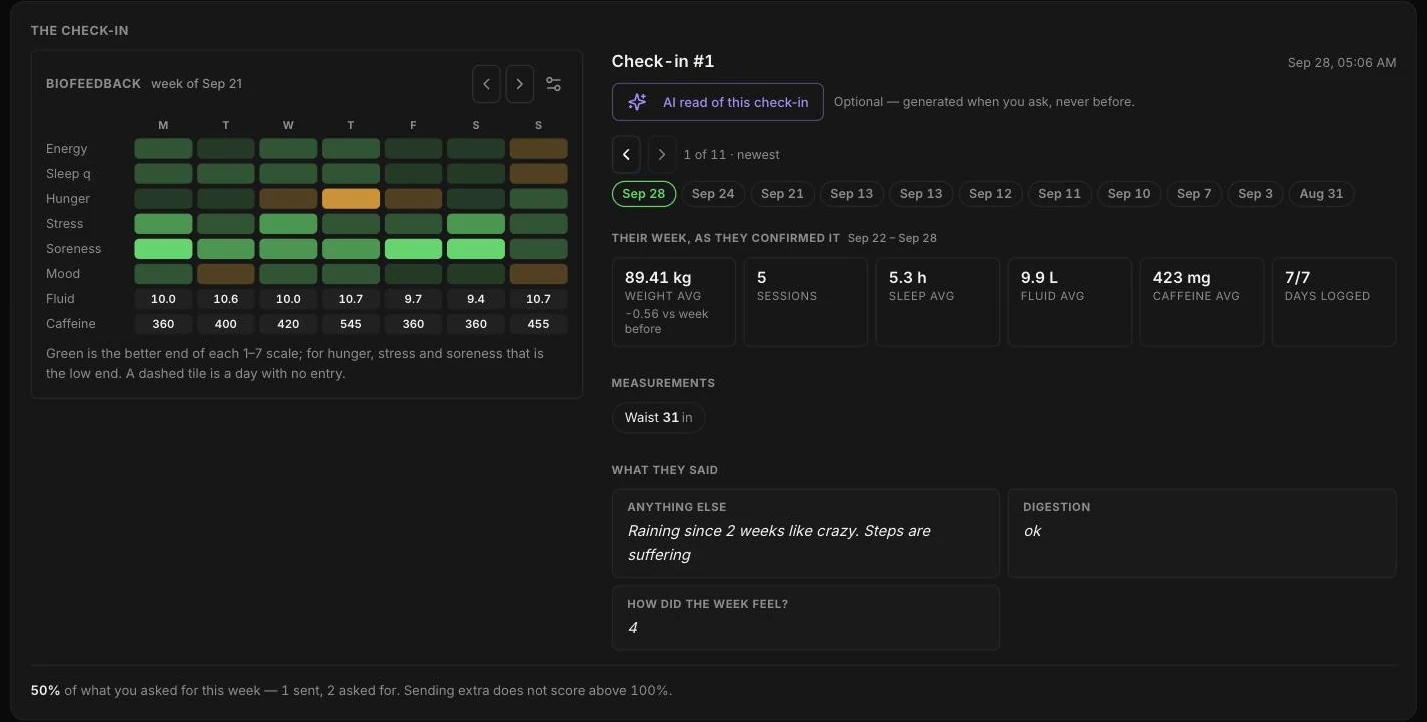
Stress, soreness, hunger, sleep quality, fluids, caffeine — every field is one you chose, and every answered day arrives here in their own account of it, ticked off hour by hour.

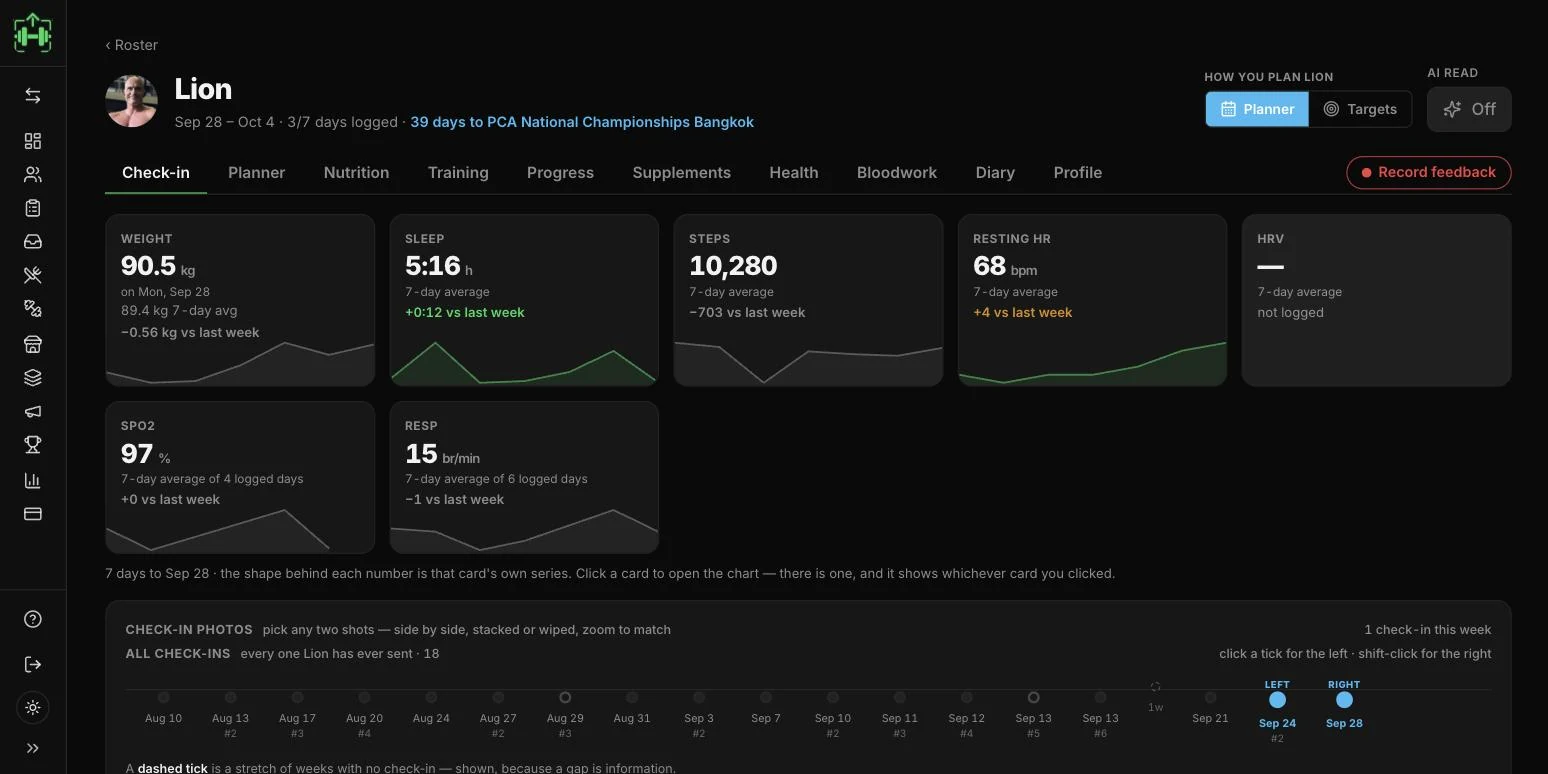
The check-in tab — the week read: weight, intake, food days, sessions, and what moved against the week before

WEEKLY · THE RECKONING

Photos and measurements against the week's averages — weight, sessions, sleep, days logged — plus how the week actually felt and what got in the way.

Try it with your own numbers →
Moving in

Bring the work you already did.

You do not rebuild a roster by hand. Photograph a training plan — your PDF, a spreadsheet, a page from the notebook — and it comes back as a real program: every set, rep range, tempo and note in place, ready to assign. Meal plans move the same way. Nothing is retyped and nothing is approximated — you check what was read before anyone trains on it.

See the scan →
1 · THE PLAN YOU ALREADY WROTE
The scanned plan in the cockpit — every food, amount and macro read off the document and open for checking before it ships
2 · WHAT CAME BACK, OPEN FOR CHECKING

Start free on the web — one client, no card, about a minute.

The cockpit · liftscan.app/coach

One screen per client,
shaped how you coach.

Roster in, then per-client tabs — training, nutrition, momentum, diary, health — on the web, reading the same data their phone writes. Nothing here is a fixed template: you choose how you plan them, what you ask them, and what the AI is allowed to do.

Configured per client, not per platform

Plan by calendar or by weekly targets — per client, switchable, and the client sees which you chose. What you require is an overlay on their own check-in sheet: it never edits their choices, so if you disconnect, their check-in is exactly what it was. Turn the AI read on or off for each person you coach.
How you plan this client — planner or targets, switchable per person, with the AI read on or off What you ask this client for — two check-ins a week, the fields you require, versioned and stamped with your name
Every day planned to the minute

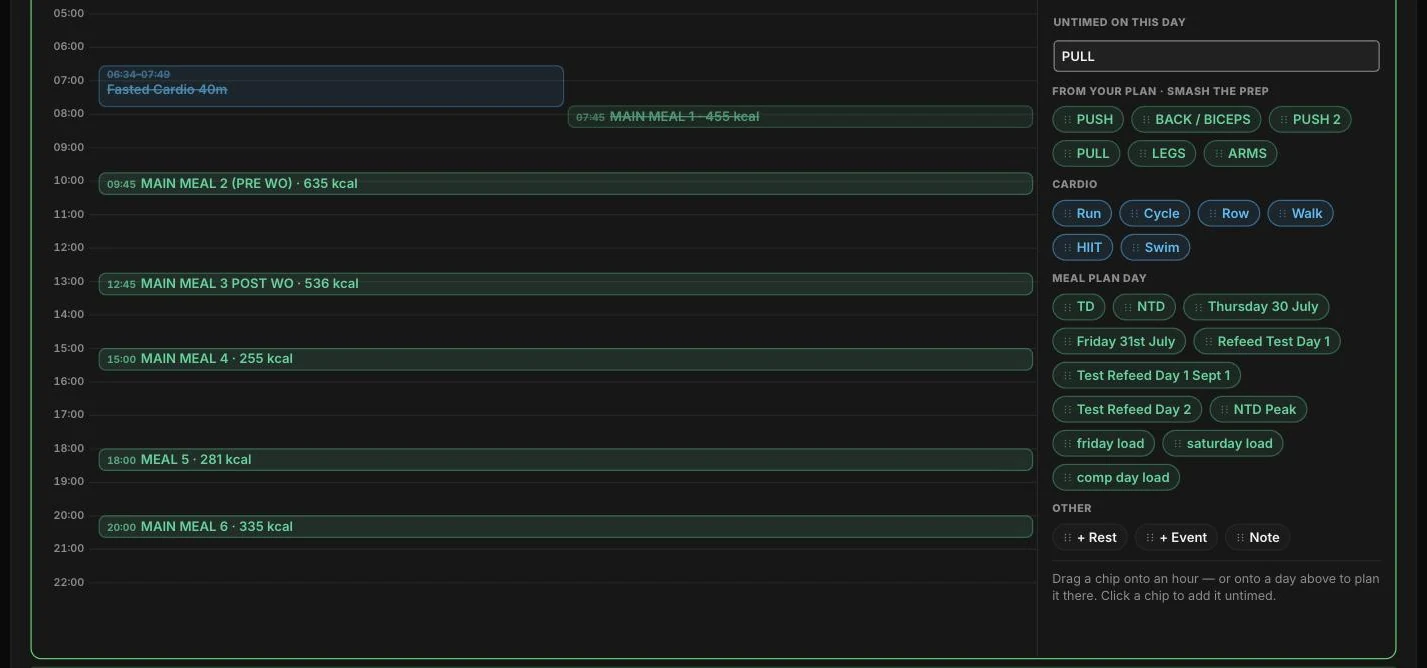
Not "Monday: push". The day is a timeline: fasted cardio 06:31–07:45, main meal 1 at 08:15, back and biceps 11:30–12:45, five more meals at the hours you set — each with its own kcal and macros, ticked off as it happens. Behind it, week after week of the same calendar, with meal-plan days you drag straight onto a date.

One day opened — an hour-by-hour timeline: fasted cardio 06:31, meals at 08:15 and 10:45, back and biceps 11:30 to 12:45 Weeks of the planner at once, with meal-plan days ready to drag onto any date, and every past day kept as a record
The season, not just the week

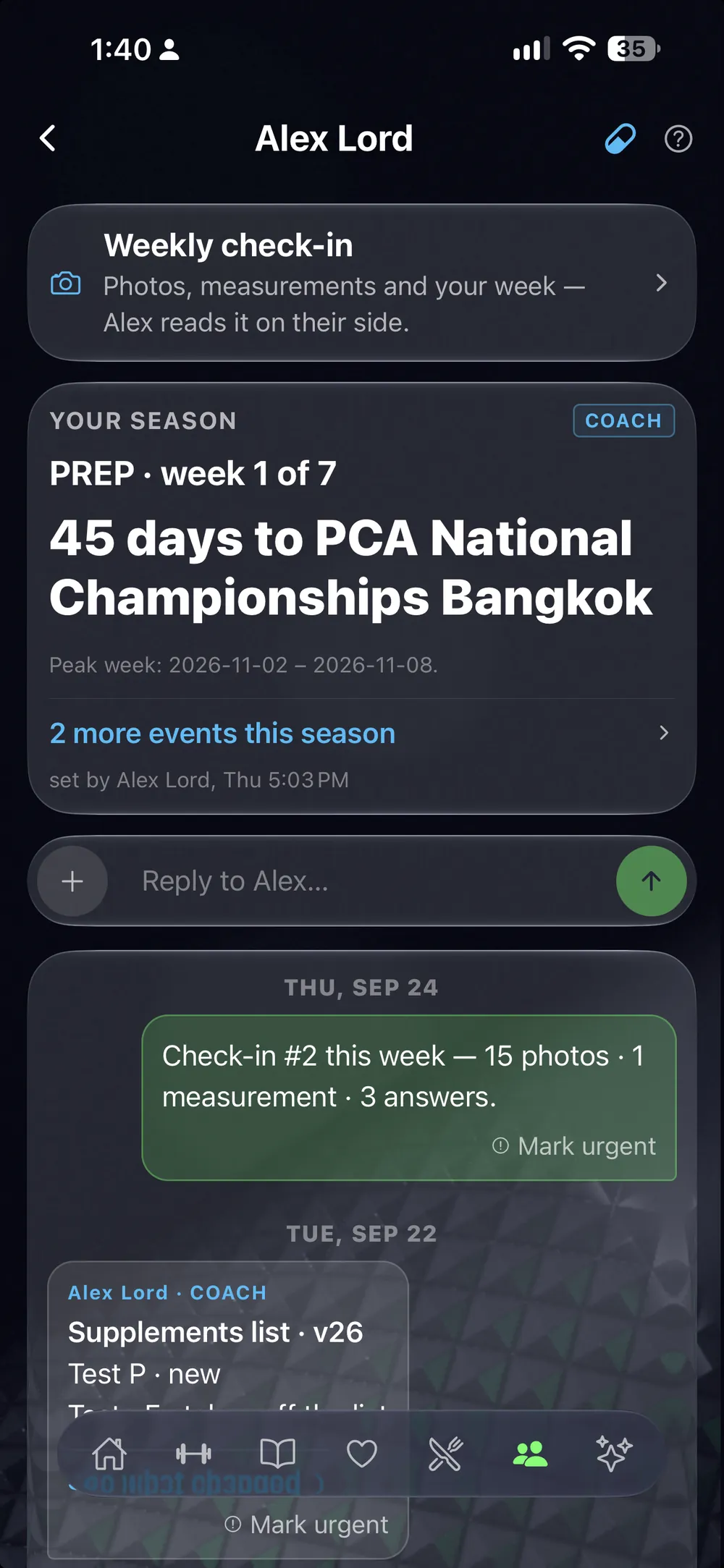
Health phase, growth, priming, prep — laid out to the day, with every competition on it and the days remaining. Peak week is a date range you set, and the client sees the same board you do.

The season — health phase, growth, priming and prep, with every competition date and the days to it The planner week — every day with its session, cardio and meal day, ticked as they are done
Weekly check-ins, photos first

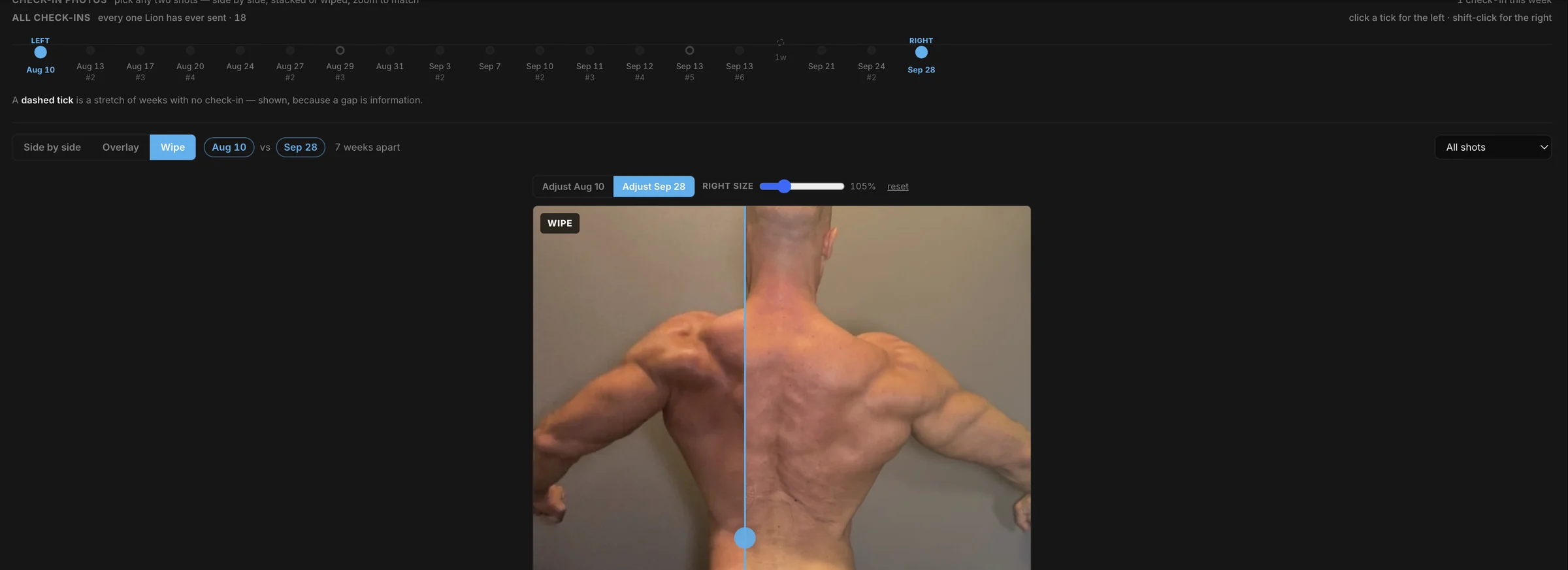
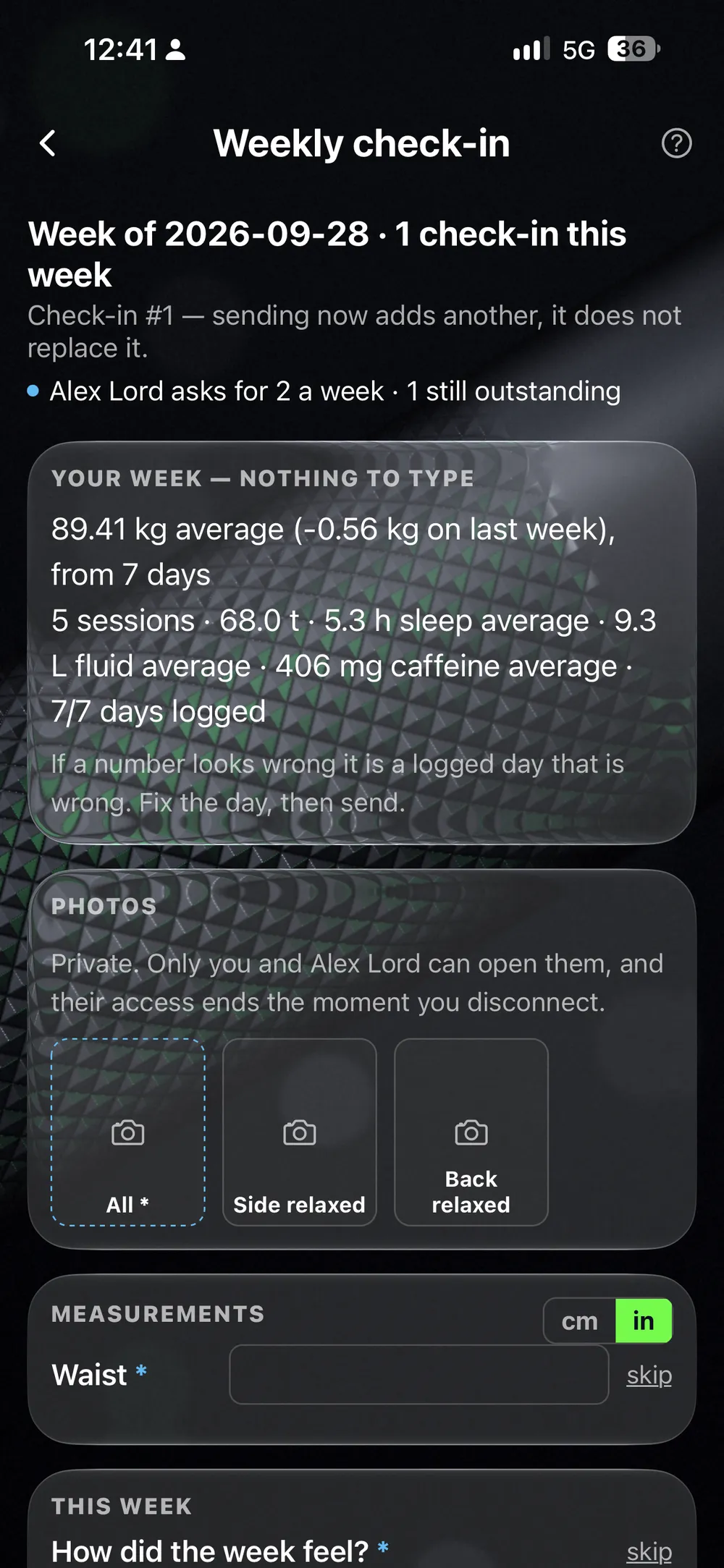
Pose photos, measurements and your questions, windowed to the week that actually ended. Pick any two shots and compare them side by side, stacked or wiped, zoomed to match — every check-in they have ever sent on one timeline, each carrying the weight and measurements frozen at the moment it was sent.

The photo compare timeline — every check-in ever sent, any two placed side by side, overlaid or wiped The week as the client confirmed it — biofeedback day by day, weight average, sessions, sleep, fluid, caffeine
Their plan, and what they did with it

The training plan they are actually running, day by day, exercise by exercise, with every previous version kept and restorable. Beside it, the week that came back: sessions, tonnage, sets, time under the bar, and a badge on the day a rep PR landed.

The client's running training plan — six days, every exercise with its sets and rep range, and previous versions kept The training week live from LiftScan — five sessions, 77.2 tonnes, 70 sets, and the day a rep PR landed
Everything their watch writes

Sleep score and recovery, weight over ninety days, sleep hours, steps, resting heart rate against HRV, and biofeedback plotted beside them. Their charts, exactly as they see them — read only, because they are theirs.

The week's health cards — weight, sleep, steps, resting heart rate and HRV, each against the week before Ninety days of sleep, steps, resting heart rate against HRV, and biofeedback on one page
Build it on the web, push it live

Your program library on one screen, and an editor built for real programming — every set, format and note, versioned. Share by link or QR; updates reach the people already training it.

The coach's program library on the web The web program editor — a full training week, set by set
The thread instead of WhatsApp

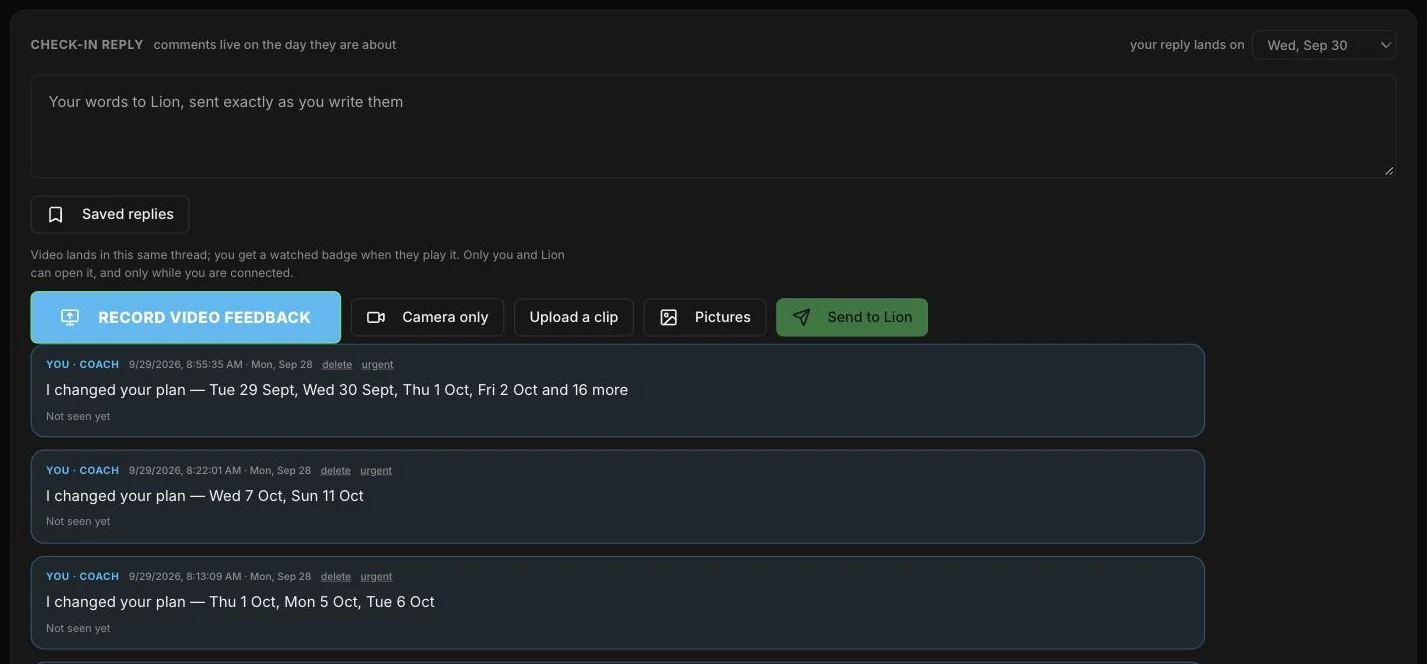
One thread per client, inside the app they already train in — and every plan change posts itself into it, so nothing is announced twice. Record video feedback right in the browser, camera bubble and audio mixed, over any check-in. No Loom link, no second inbox, and every message carries a read receipt.

The client thread — record video feedback, camera only, upload a clip or pictures, sent straight to the client Read receipts on the thread — each change stamped seen, with the time they opened it
Meal plans that ship

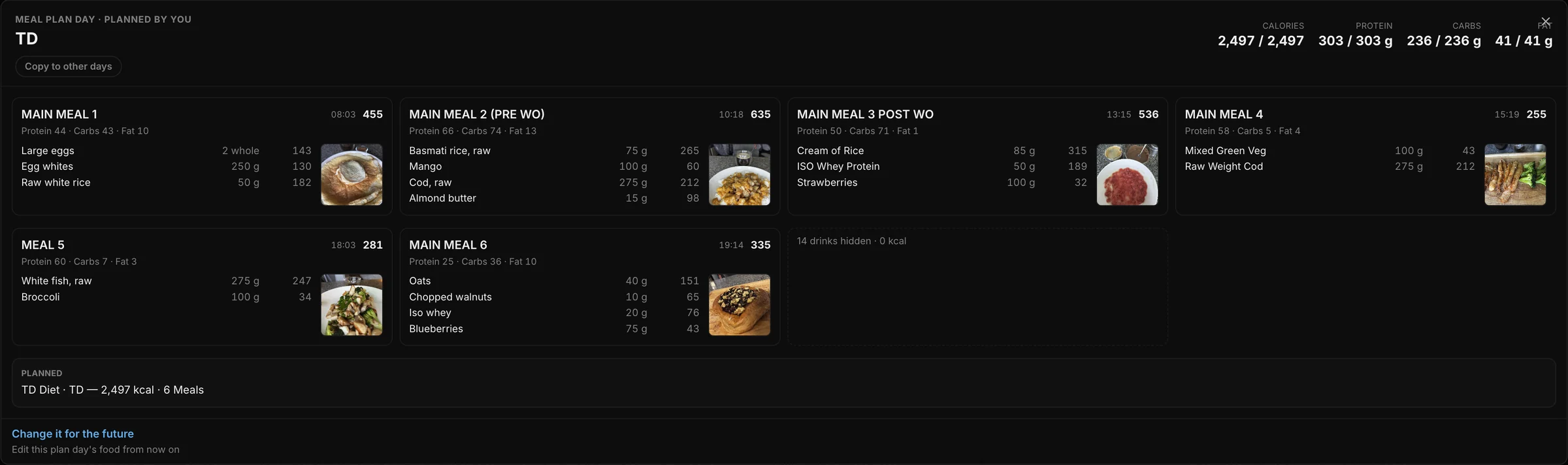
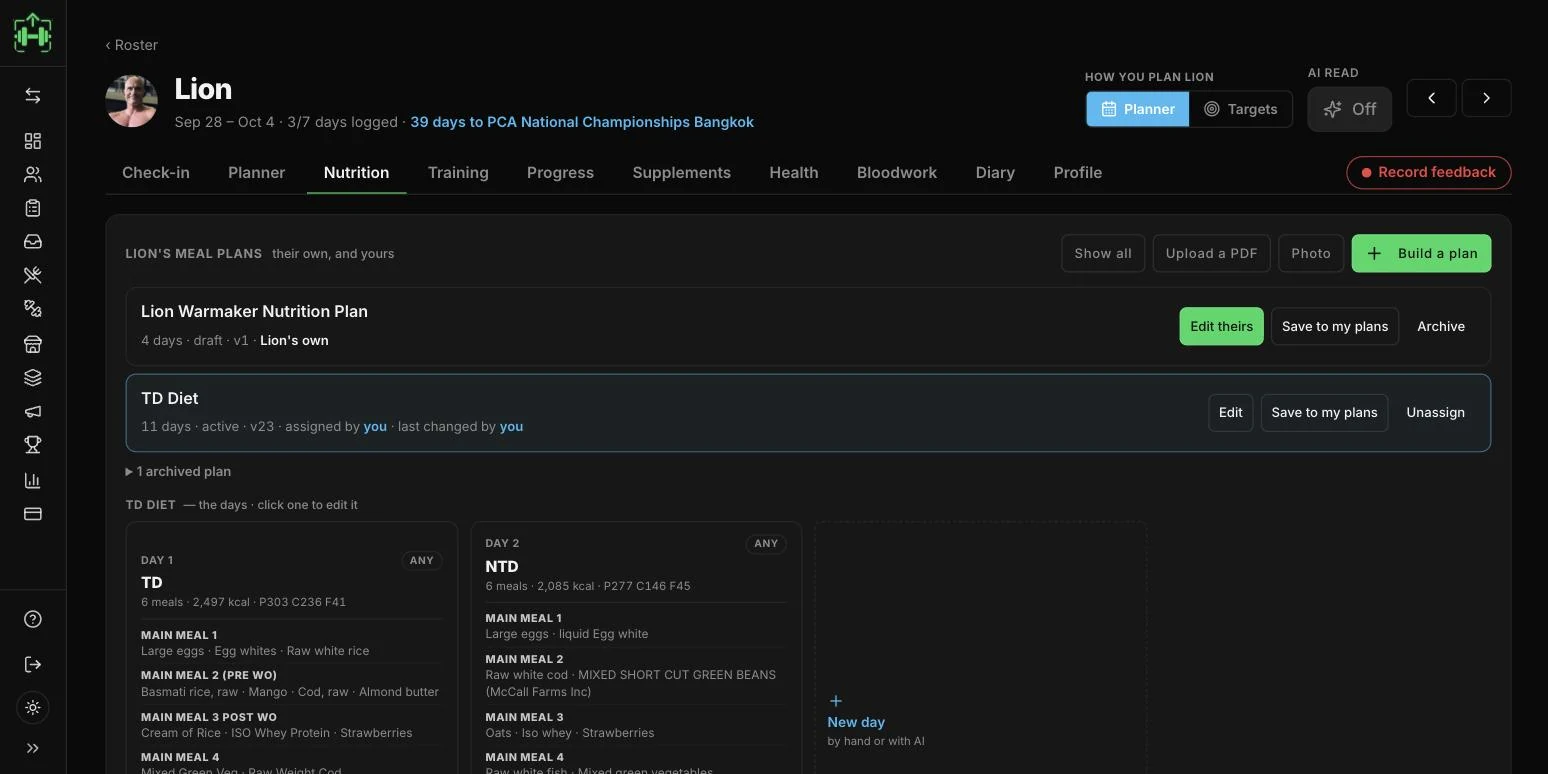
Build one, or photograph the PDF — it transcribes to real meal days with the plan's own numbers, published straight into their nutrition tab. Every food, amount and macro stays editable and the macros rescale with the amount. Plans are versioned and attributed: theirs stays theirs, and they can change it straight back.

The client's meal plans — their own and the one you assigned, each day with its meals and macros The meal editor — every food, amount, calories, protein, carbs and fat, editable line by line
The diary answers "is it working"

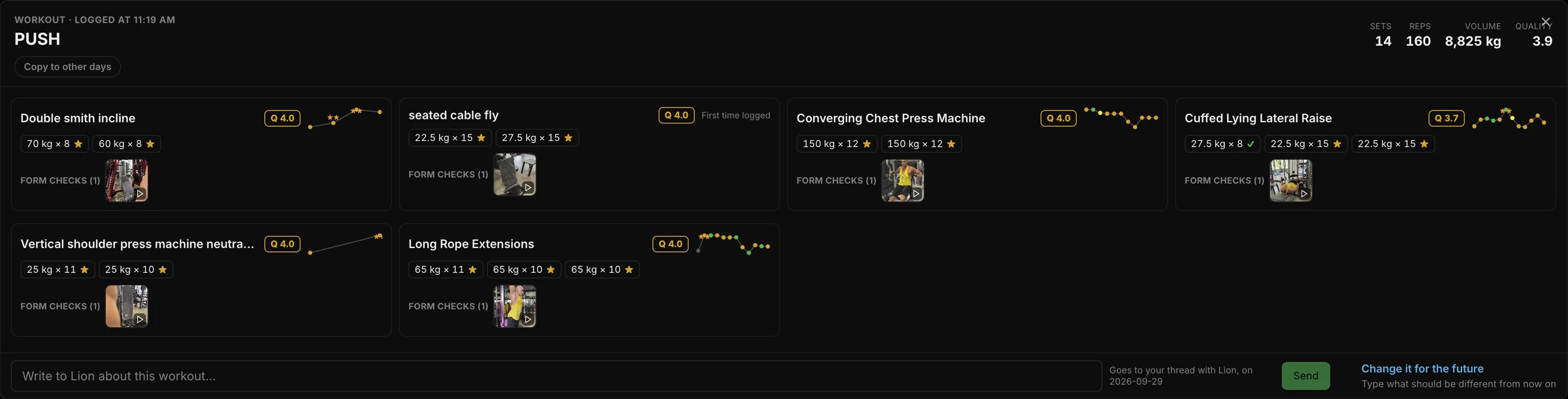
Every client day on one page — sessions, meals, notes, photos — and in peak week, your plan next to their reality. Open any session and every set is there as it was performed, weight by weight.

Client diary — every day, prescribed next to performed One session opened — every set as it was actually performed
Their media is locked down

Coach–client photos and videos live in a private bucket; links are minted per viewer and expire. End the connection and access is revoked — retroactively.

Set it up on the web →
The coach app · iOS

The same roster, in your pocket.

Three tabs — Today, Clients, Inbox. Open a client and the same five views the cockpit has are there: check-in, plan, nutrition, health, diary. It is not a notifications app with a list in it. You can review a week, move a session, lay a day out by the hour and rewrite a meal plan standing in the gym between your own sets.

The check-in tab on the phone — the latest week with weight, sessions and a Review button, and every check-in before it
CHECK-IN · THE WEEK
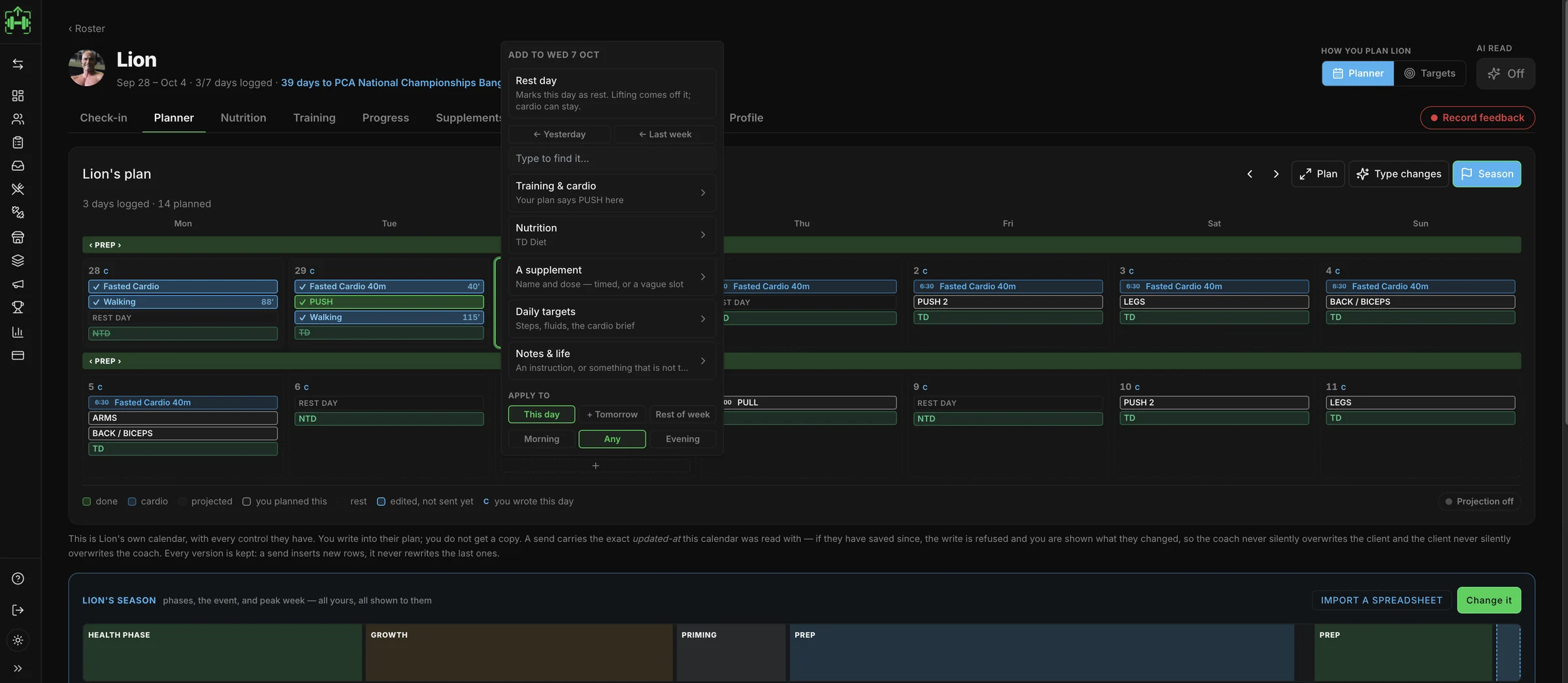
A day tapped open in the month — move it, lay it out by the hour, make it a rest day, note it, or remove just this week
THE MONTH, AND ONE DAY
Laying a whole programme onto the calendar from a start date, staged and not sent until you send it
A PROGRAMME, ONTO THE DATES
Putting meal days on the calendar — each plan day dropped onto the dates it belongs on
MEAL DAYS, ONTO THE DATES
The nutrition day — eaten against planned, protein, carbs and fat against their targets, meals ticked off
WHAT THEY ATE
The meal plan editor on the phone — read from your text, every food a row of amount, calories and macros, nothing saved yet
THE PLAN, REWRITTEN
Health on the phone — sleep score, recovery, and the metrics over 7, 30 or 90 days
THEIR HEALTH
The diary day — the plan ticked off, food, fluids, sleep stages, recovery against baseline, steps and tonnage
THE DAY, AS IT HAPPENED
The coach inbox on the phone — one thread per client, with what you last sent them
THE THREAD
A week reviewed on a train

Open the latest check-in and it is all there: weight, arm, waist, sleep average, days logged, sessions — and their answers to the questions you set, in their words. Two photographs side by side or wiped over each other, with a dot for every check-in they have ever sent. Reply from the same screen.

Plan from a phone, not just from a desk

Lay a whole programme onto the calendar from a start date — eighty days staged, and nothing reaches them until you send it. Drop meal days onto the dates they belong on. Tap any single day to move it, lay it out by the hour, make it a rest day, leave a note they will see, or pull just this week's copy without touching the rotation. Every change lands stamped with your name and the date.

Rewrite the meal plan from your phone

Their plan opens with a note field, the days as chips, and every meal with its calories. Edit the plan and each food is a row — amount, kcal, protein, carbs, fat — or paste your text and let it read the plan back to you before anything is saved.

Their health, not your guess

Sleep score, recovery, weight trend, sleep hours and steps over 7, 30, 90 days or all of it. The diary underneath shows the day as it happened: the plan ticked off, food, fluids, sleep stages, HRV against baseline, steps and tonnage.

Your storefront

The page that sells your programs sells your coaching.

Creator storefronts sell programs and coaching subscriptions with web checkout — a client who subscribes is connected to your cockpit automatically. Promo codes carry attribution, permanently.

Your storefront →
Your coaching offer — sold from your storefront

Your first program can be in the app tonight.

Who built this

Built by a coach, for his own clients.

Leon Wehrmaker has coached for 22 years and competes in PCA Men's Physique. LiftScan is the app he coaches from — and the one his own prep coach runs his contest prep in. Every field, every check-in and every plan on this page exists because a real prep needed it.

See the cockpit →
Pricing · per roster, not per feature

Pay for seats. Everything is in.

Your first client is free for you. No card, no clock — the full cockpit with one client, for as long as you like. That client keeps their own LiftScan plan. A paid seat covers a client's whole app, from the second client onward.

Moving a roster over, or want to see the cockpit on your own clients first? Book 20 minutes — we will walk your plans through the scan together.

A paid seat covers the client's entire app — training, food, health, check-ins — so those clients never pay LiftScan anything. Moving from sheets? Most of a client's history can be brought in — ask on the call.

A client's data stays the client's. End the coaching and the connection ends — they keep everything, you keep nothing of theirs.

Free
$0/mo
1 CLIENT · THEY KEEP THEIR OWN PLAN

The full cockpit, one client. No card, no clock. Your client pays for their own app, from $2.99 a month — a paid seat would cover it for them.

Starter
$39/mo
UP TO 10 CLIENTS

The full cockpit, every feature, ten seats. $3.90 a client at capacity — less than their tier would retail for.

Pro
$119/mo
UP TO 50 CLIENTS

The working coach's tier. $2.38 a client at capacity.

Unlimited
$199/mo
NO CAP

For rosters that outgrew counting.

Prices in USD. Billed monthly, cancel any time.

Try it with your own numbers →
Is it free to start?

Yes, for you. One client, the full cockpit, no card, no time limit. That client keeps their own LiftScan plan. From the second client you need a seat — Starter is $39 a month for up to ten, and a seat covers each client's whole app.

How does a client join me?

Roster → Invite gives you a link. They tap it, sign in and accept. Their log is on your screen from that day on.

What do my clients pay?

On a paid seat, nothing — it covers their whole app. On the free seat, your one client pays for their own app.

Where do I log in?

liftscan.app/coach — the cockpit's own address. Same account as the web studio, and a coach who also trains switches hats without switching accounts.

What if I stop coaching someone?

The connection ends; their data stays theirs, on their device — and your shared media access is revoked with it.

Start free on the web — one client, no card, about a minute.